CSS3背景图像区域
background-clip : 指定背景绘制区域
语法
background-clip: border-box | padding-box | content-box
- border-box(默认) : 背景被裁剪到边框盒
- padding-box : 背景被裁剪到内边距框
- content-box : 背景被裁剪到内容框
兼容性 : IE9+
.box{ background-clip: padding-box; }
背景图像定位
background-origin : 指定规定 background-position 属性相对于什么位置来定位
语法
background-origin: border-box | padding-box | content-box
- border-box : 背景图像相对于边框盒来定位
- padding-box(默认) : 背景图像相对于内边距框来定位
- content-box : 背景图像相对于内容框来定位
兼容性 : IE9+, Firefox4+, Safari5+
background-clip和background-origin的联系与区别
background-clip指定了背景在哪些区域可以显示,但与背景开始绘制的位置无关,背景的绘制的位置可以出现在不显示背景的区域,这时就相当于背景图片被不显示背景的区域裁剪了一部分一样。
background-origin指定了背景从哪个区域(边框、补白或内容)开始绘制,但也仅仅能控制背景开始绘制的位置,你可以用这个属性在边框上绘制背景,但边框上的背景显不显示出来那就要由background-clip来决定了。
背景图像大小
background-size : 指定背景图像大小
语法
background-size: length | percentage | cover | contain;
- length : 第一个值设置宽度,第二个值设置的高度。如果只给出一个值,第二个是设置为”atuo(自动)”
- percentage : 第一个值设置宽度,第二个值设置的高度。如果只给出一个值,第二个是设置为”auto(自动)”
- cover : 保持图像的纵横比并将图像缩放成将完全覆盖背景定位区域的最小大小
- contain : 保持图像的纵横比并将图像缩放成将适合背景定位区域的最大大小
兼容性 : IE9+, Firefox4+, Safari5+
.box{ background-size: 100px 100px }
.box{ background-size: 200px }
.box{ background-size: 100% 100% }
.box{ background-size: 50% }
.box{ background-size: cover }
.box{ background-size: contain }
cover和contain的联系与区别
- 两者都保持背景图片的纵横比
cover保证背景图片完全覆盖,也就是短边长度等于容器短边长度,图片可能有一部分无法显示contain长边长度等于容器长边长度,容器可能有一部分没有被背景图片覆盖
CSS3多重背景图像
CSS允许为元素使用多个背景图像
语法
background-image: url('img1.jpg'), url('img2.jpg') ... ;
引入顺序在前的优先显示
CSS3背景属性整合
语法
background: color position size repeat origin clip attachment image;
//属性整合写法
.box{
	background: #ccc center 50% no-repeat content-box content-box fixed url('1.jpg');
}

//建议写法

.box{
	background: #ccc url('1.jpg') no-repeat center center;
	background-size: 50%;
	background-origin: content-box;
	background-clip: content-box;
	background-attachment: fixed;
}
CSS3渐变
渐变(gradients)可以在两个或者多个指定的颜色之间显示平稳的过渡
兼容性
| IE | Chrome | Firefox | Safari | Opera |
|---|---|---|---|---|
| 10.0 | 26+ | 16+ | 6.1+ | 12.1+ |
| 10.0 -webkit- | 3.6 -moz- | 5.1 -webkit- | 11.6 -o- |
CSS3线性渐变
linear-gradient
沿着一根轴线改变颜色,从起点到终点颜色进行顺序改变(从一边拉向另一边)
语法
background: linear-gradient(direction, color-stop1, color-stop2...);
参数direction不同设置方向不同
background: -webkit-linear-gradient( begin-direction, red , blue); /* Safari 5.1 - 6.0 */
background:    -moz-linear-gradient(   end-direction, red, blue); /* Firefox 3.6 - 15 */
background:      -o-linear-gradient(   end-direction, red, blue); /* Opera 11.1 - 12.0 */
background:         linear-gradient(to end-direction, red , blue); /* 标准的语法 */
从左到右渐变
#grad {
  background: -webkit-linear-gradient(left, red , blue);     /* Safari 5.1 - 6.0 */
  background:    -moz-linear-gradient(right, red, blue);     /* Firefox 3.6 - 15 */
  background:      -o-linear-gradient(right, red, blue);     /* Opera 11.1 - 12.0 */
  background:         linear-gradient(to right, red , blue); /* 标准的语法 */
}
从左上角到右下角的线性渐变
#grad {
  background: -webkit-linear-gradient(left top, red , blue); /* Safari 5.1 - 6.0 */
  background:    -moz-linear-gradient(bottom right, red, blue); /* Firefox 3.6 - 15 */
  background:      -o-linear-gradient(bottom right, red, blue); /* Opera 11.1 - 12.0 */
  background:         linear-gradient(to bottom right, red , blue); /* 标准的语法 */
}
角度渐变
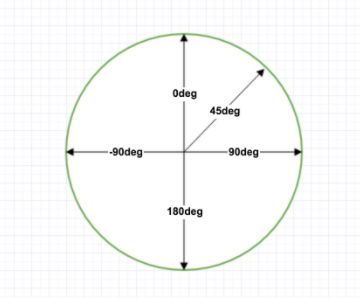
角度是指水平线和渐变线之间的角度,逆时针方向计算。换句话说,0deg 将创建一个从下到上的渐变,90deg 将创建一个从左到右的渐变。
语法: background: linear-gradient(angle, color-stop1, color-stop2...);
#grad {
  background: -webkit-linear-gradient(180deg, red, blue); /* Safari 5.1 - 6.0 */
  background:    -moz-linear-gradient(180deg, red, blue); /* Firefox 3.6 - 15 */
  background:      -o-linear-gradient(180deg, red, blue); /* Opera 11.1 - 12.0 */
  background:         linear-gradient(180deg, red, blue); /* 标准的语法 */
}
颜色节点控制
语法:
background: linear-gradient(color1 length|percentage,
                            color2 length|percentage,
                            ...);`
颜色也可以用rgba()
#grad {
  background: -webkit-linear-gradient(left,rgba(255,0,0,0),rgba(255,0,0,1)); /* Safari 5.1 - 6 */
  background:    -moz-linear-gradient(right,rgba(255,0,0,0),rgba(255,0,0,1)); /* Firefox 3.6 - 15*/
  background:      -o-linear-gradient(right,rgba(255,0,0,0),rgba(255,0,0,1)); /* Opera 11.1 - 12*/
  background:         linear-gradient(to right, rgba(255,0,0,0), rgba(255,0,0,1)); /* 标准的语法 */
}
重复线性渐变
语法: background: repeating-linear-gradient(color-stop1, color-stop2...);
/* Safari 5.1 - 6.0 */
background: -webkit-repeating-linear-gradient(red, yellow 10%, green 20%);
/* Firefox 3.6 - 15 */
background:    -moz-repeating-linear-gradient(red, yellow 10%, green 20%);
/* Opera 11.1 - 12.0 */
background:      -o-repeating-linear-gradient(red, yellow 10%, green 20%);
/* 标准的语法 */
background:         repeating-linear-gradient(red, yellow 10%, green 20%);
CSS3径向渐变
radial-gradient
从起点到终点颜色从内到外进行圆形渐变(从中间向外拉)
语法
background: radial-gradient(center, shape size, start-color, ..., last-color);
设置形状
语法
background: radial-gradient(shape, start-color, ..., last-color);
shape 参数定义了形状。它可以是值 circle 或 ellipse。其中,circle 表示圆形,ellipse 表示椭圆形。默认值是 ellipse。
如果元素宽高设置都一样,那不论参数是circle还是ellipse,显示效果都为圆形
#grad {
  background: -webkit-radial-gradient(circle, red, yellow, green); /* Safari 5.1 - 6.0 */
  background:    -moz-radial-gradient(circle, red, yellow, green); /* Firefox 3.6 - 15 */
  background:      -o-radial-gradient(circle, red, yellow, green); /* Opera 11.6 - 12.0 */
  background:         radial-gradient(circle, red, yellow, green); /* 标准的语法 */
}
尺寸大小关键字
语法
background: radial-gradient(size, start-color, ..., last-color);
size 参数定义了渐变的大小。它可以是以下四个值:
closest-side最近边farthest-side最远边closest-corner最近角farthest-corner最远角
div.closest-side {
	width: 300px; height: 200px; margin: 50px;
	background: -webkit-radial-gradient(30% 70%, closest-side circle, red, blue);
	background:    -moz-radial-gradient(30% 70%, closest-side circle, red, blue);
	background:      -o-radial-gradient(30% 70%, closest-side circle, red, blue);
	background:         radial-gradient(30% 70%, closest-side circle, red, blue);
}
div.farthest-side {
	width: 300px; height: 200px; margin: 50px;
	background: -webkit-radial-gradient(30% 70%, farthest-side circle, red, blue);
	background:    -moz-radial-gradient(30% 70%, farthest-side circle, red, blue);
	background:      -o-radial-gradient(30% 70%, farthest-side circle, red, blue);
	background:         radial-gradient(30% 70%, farthest-side circle, red, blue);
}
div.closest-corner {
	width: 300px; height: 200px; margin: 50px;
	background: -webkit-radial-gradient(30% 70%, closest-corner circle, red, blue);
	background:    -moz-radial-gradient(30% 70%, closest-corner circle, red, blue);
	background:      -o-radial-gradient(30% 70%, closest-corner circle, red, blue);
	background:         radial-gradient(30% 70%, closest-corner circle, red, blue);
}
div.farthest-corner {
	width: 300px; height: 200px; margin: 50px;
	background: -webkit-radial-gradient(30% 70%, farthest-corner circle, red, blue);
	background:    -moz-radial-gradient(30% 70%, farthest-corner circle, red, blue);
	background:      -o-radial-gradient(30% 70%, farthest-corner circle, red, blue);
	background:         radial-gradient(30% 70%, farthest-corner circle, red, blue);
}

重复径向渐变
语法
background: repeating-radial-gradient(color1 length|percentage,
                                      color2 length|percentage,
                                      ...);`
div {
    width: 800px; height: 500px;
    background: -webkit-repeating-radial-gradient(red 0%, blue 10%, red 20% );
    background:    -moz-repeating-radial-gradient(red 0%, blue 10%, red 20% );
    background:      -o-repeating-radial-gradient(red 0%, blue 10%, red 20% );
    background:         repeating-radial-gradient(red 0%, blue 10%, red 20% );
}
IE渐变
filter: progid:DXImageTransform.Microsoft.gradient( startColorstr = #80c1e7, endColorstr = #213c7c, gradientType = 1);
GradientType
- 0代表从上到下
- 1代表从左到右
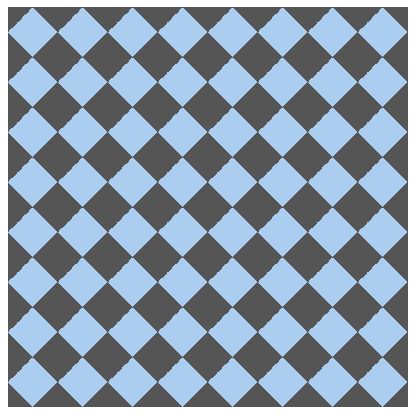
综合案例
div {
    width: 400px; height: 400px;
    background: #abcdef;
    background-size: 50px 50px;
    background-image:
        linear-gradient(45deg, #555 25%, transparent 25%, transparent),
        linear-gradient(-45deg, #555 25%, transparent 25%, transparent),
        linear-gradient(45deg, transparent 75%, #555 75%),
        linear-gradient(-45deg, transparent 75%, #555 75%);
}